


The printer driver and RIP solution
Get the highest possible print quality with PrintFab
Perfect colors for photography, dye sublimation and pre-press. Maximum ink coverage for silkscreen printing (PrintFab Pro XL)
PrintFab 3 with the new PrintFab Composer
PrintFab for Mac now comes with the layout and RIP software PrintFab Composer.
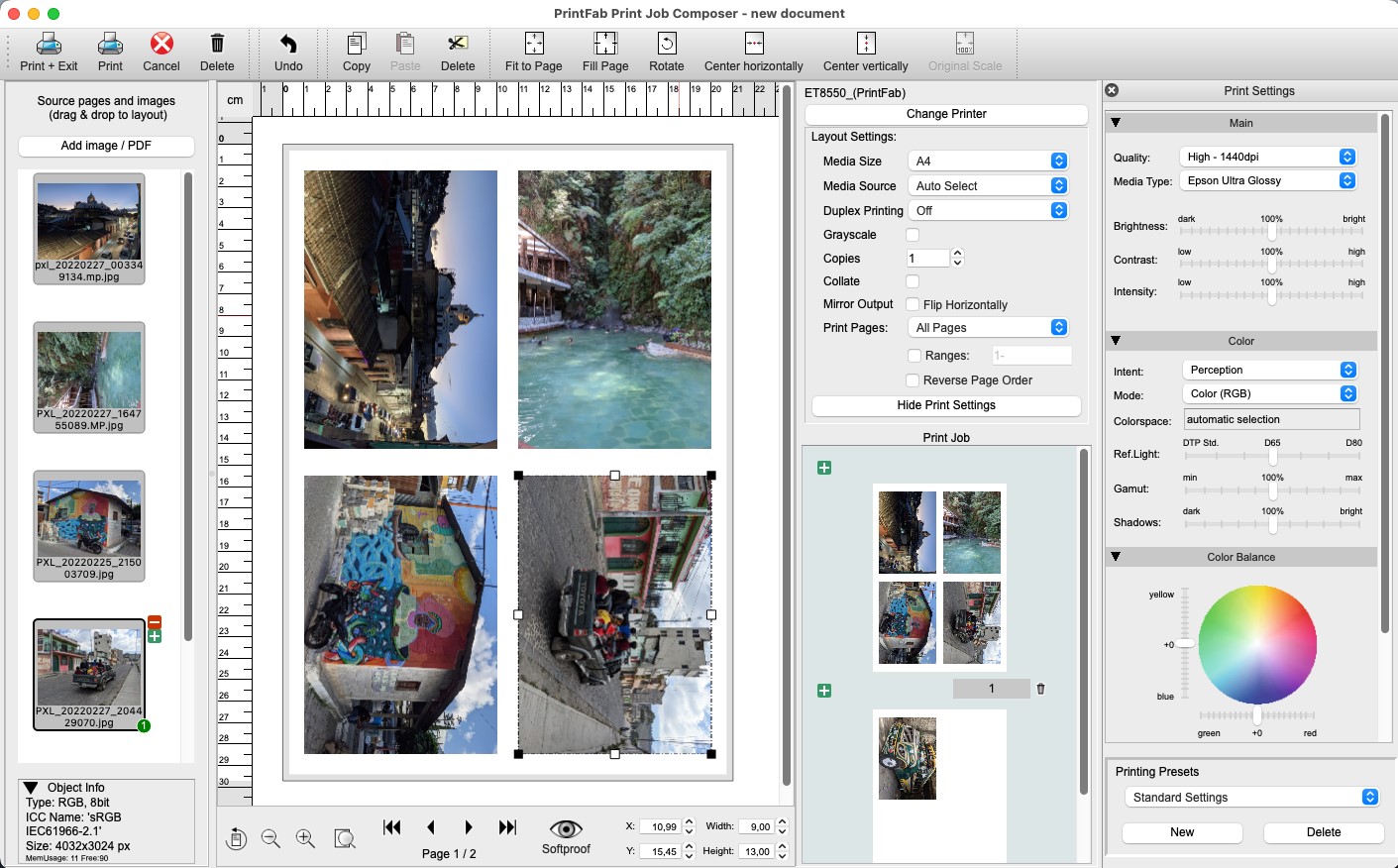
With the new Composer, PrintFab is now a fully-fledged RIP - load photos and PDF documents directly into PrintFab, determine the print position simply with the mouse, by numerical input or via the layout wizard.
For high printing demands
Print quality can be clearly improved by adjusting the printer to paper and ink with PrintFab and its innovative color management

- Silk screen film printing mode with adjustable halftone raster
- NEW drivers for Canon Maxify GX, Epson EcoTank, HP SmartTank
- powerful color management, optimum print quality
- excellent colour precision even with third party ink and paper
- print preview & layout editor
- intelligent ink saving system
- ICC profiles for printer and documents
- affordable color profiling service
- PrintFab Pro can work as CMYK RIP software (Raster Image Processor)
- cross platform solution: also available for Windows and Linux
- supports over 300 printer models (Canon, Epson, HP, ...)
Choose your field of application and learn more about PrintFab:

Silkscreen, Dye Sublimation & more

Dye transfer with ICC profiles, high quality screen films, low-cost production printing
more...


Four editions for home and professional use
PrintFab Home is designed for the advanced home user, PrintFab Home L supports larger formats and ICC profiles and is targeted at ambitious photographers.
PrintFab Pro and Pro XL are advanced versions for professional users, especially in publishing and pre-press business with support for CMYK proof printing.
News
V3.0.2 with PrintFab Composer
V2.99-2 supports macOS 26 Tahoe
V2.99-1 supports macOS 15 Sequoia
V2.98-3 new printer drivers for Canon MAXIFY GX, Epson ET-14100, ET-18100, HP SmartTank
V2.98-2 supports macOS 14 Sonoma, new printer drivers for Canon PIXMA G5000, G6000, G7000 series, Epson L8050, L18050
V2.98 supports macOS 13 Ventura, new printer drivers for Epson L1200, L3200, L4200, L5200, L6200 series, L11160, L14150, L15150, L15160
V2.97 with new printer drivers for Epson EcoTank ET-8500, ET-8550, ET-16600, ET-16650, Epson SureColor SC-P700, SC-P900
V2.96 with native M1 support, new printer drivers for Epson ET-16650, SC-T3200, SC-T5200, SC-T7200
V2.95 supports macOS 11 Big Sur, new printer drivers for Canon imagePROGRAF Pro-4000, TM-300
V2.94 new printer drivers for Epson SureColor SC-T3100 / T5100 / F500 / F570
V2.93 supports macOS 10.15 Catalina, new high-quality drivers for Epson EcoTank ET-16500, Epson WorkForce WF-7210, WF-7710, WF-7720
V2.92 new drivers for Canon PIXMA TS702/705, TS6220/6250, TS8220/8250, TS9520/9550, TR4520/4550, Epson XP-7100, HP OfficeJet Pro 7720, 7730, 7740
V2.91 new drivers for Epson L series printers, PrintFab Pro XL: new silkscreen raster mode
V2.90 supports macOS 10.14 Mojave, new drivers for Canon PIXMA G1500, G2500, G3500
System requirements:
- macOS 10.13 - 26.x Apple Silicon or Intel CPU (older Mac computers on request)
- printers supported by PrintFab list of supported printers
- also available for Windows and Linux